Parents hand you their children every Sunday. The check-in desk is where they decide, often without saying it, whether your church is a safe place. A clear, consistent check-in process protects children, gives parents peace of mind and protects your volunteers too.
This guide covers the core practices most churches use for nursery, Sunday school, midweek programs and events like VBS, plus how technology makes each step easier.
This is a general guide. Your insurance carrier and denomination may have specific requirements, and some programs (like licensed child care) follow state rules. Check with them when you write your policy.
The 6 core practices
1. Every child is checked in, every time
No exceptions for "regulars" or staff kids. A check-in record tells you exactly which children are in the building and in which room. In an emergency evacuation, that list is what you count against.
2. Matching security codes at pickup
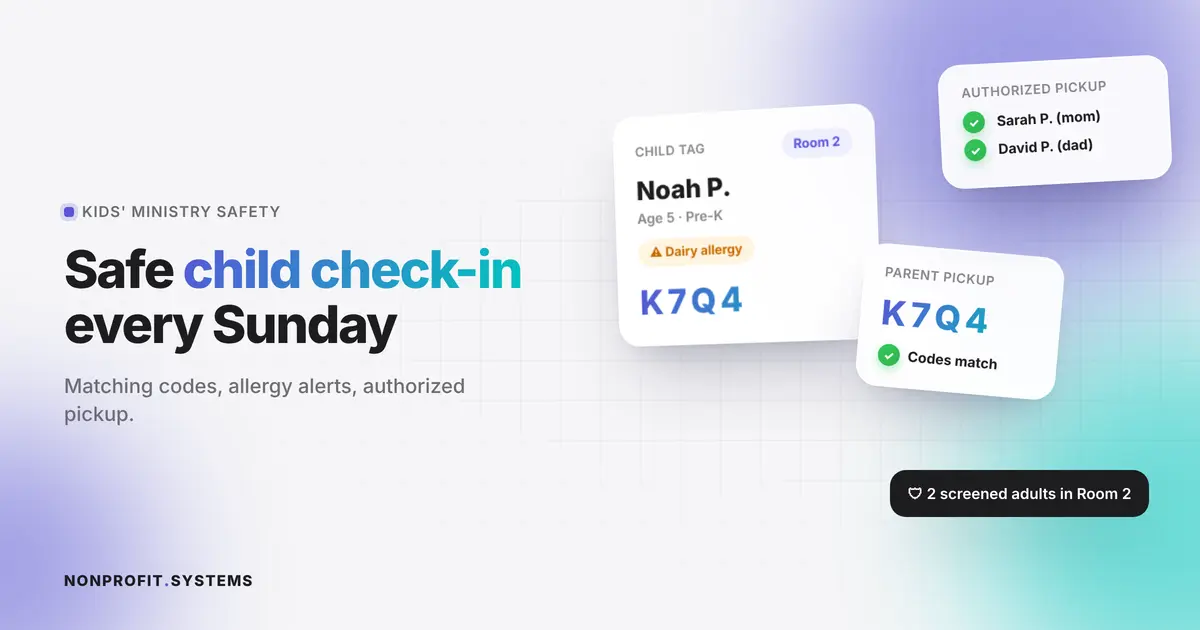
At check-in, the child gets a name tag and the parent gets a matching pickup tag (or a code on their phone). At pickup, a volunteer matches the two before releasing the child.
- The code should be random and change every visit
- Lost pickup tag? The child stays until a leader verifies the adult against the registration record and photo ID
3. Authorized pickup list
During registration, parents list who may pick up each child. Custody situations and restraining orders should be noted confidentially and visible only to ministry leaders. Volunteers see a simple "release only to listed adults" alert.
4. Allergy and medical alerts that volunteers actually see
An allergy note buried in a registration form does not protect anyone. The alert should be printed on the child's name tag (an icon is enough) and shown on the room roster the leader holds. Keep medical details limited to what the room leader needs.
5. Screened and trained volunteers
- Background checks for every adult serving with children, renewed on a regular schedule
- A minimum waiting period before new attendees can serve (many churches use six months)
- Short annual training: check-in steps, bathroom policy, reporting concerns
- Volunteers check in too, so you know who was serving in which room
6. The two-adult rule
At least two screened adults in every room, and no adult alone with a child out of sight of others. Rooms should have windows in doors or doors kept open. When volunteers are short, combine rooms instead of breaking the rule.
Paper vs. digital check-in
| Paper | Digital check-in | |
|---|---|---|
| Speed at the desk | Slow on busy Sundays | QR scan or phone number lookup in seconds |
| Pickup codes | Hand-written, easy to copy | Random, printed or on parent's phone |
| Allergies | Easy to miss | Printed on name tag automatically |
| Authorized pickup | Binder at the desk | Attached to each child's record |
| Attendance reports | Counted by hand | Automatic, by room and date |
| Emergency roster | Whatever was written down | Live list by room |
| Parent messaging | Not possible | Text a parent from the room if needed |
Digital check-in is not only for large churches. A tablet, a small label printer and a registration system connected to your website are enough for most small churches.
What good check-in software should do
- let families register once, online, before their first visit
- support QR codes or phone-number lookup at a kiosk or volunteer tablet
- print name tags and matching pickup tags with allergy icons
- assign children to rooms by age or grade automatically
- keep authorized pickup and custody notes, with confidential notes visible only to leaders
- give leaders a live roster by room
- check volunteers in too
- store data securely, with access limited by role
This is exactly what we build for children's ministries and events like VBS. See how it works in our VBS registration and check-in guide or the VBS check-in app.
When something goes wrong
Your written policy should cover, step by step:
- A child is missing: close exits, use the room roster, alert all leaders, contact parents, call 911 if not found quickly
- An unauthorized adult tries to pick up a child: keep the child in the room, involve a leader, contact the parent on file
- An injury or allergic reaction: first aid, contact the parent immediately, document what happened the same day
- A concern about abuse: follow your church's reporting procedure. In Florida, anyone who suspects child abuse is required by law to report it to the Florida Abuse Hotline (1-800-96-ABUSE)
Keep an incident report form ready in every room, and review incidents with leaders.
Sample check-in policy outline
- Purpose and scope (which programs it covers)
- Registration requirements
- Check-in and pickup procedure, including matching codes
- Authorized pickup and custody notes
- Allergy and medical information handling
- Volunteer screening, waiting period and training
- Two-adult rule and room setup
- Bathroom and diapering procedures
- Emergency procedures and evacuation
- Incident reporting and mandatory reporting
- Data privacy: who can see what
FAQ
What is a church check-in system?
A process, usually supported by software, for registering children when they arrive, assigning them to rooms, printing matching security tags and releasing them only to authorized adults.
How do church security tags work?
The child's name tag and the parent's pickup tag share a random code. Volunteers release a child only when the codes match.
Do small churches need digital check-in?
Not necessarily, but even a simple tablet-based system makes pickup codes, allergy alerts and emergency rosters much more reliable than paper.
What is the two-adult rule in children's ministry?
At least two screened adults are present with children at all times, and no adult is alone with a child out of sight of others.
Who must report suspected child abuse in Florida?
Florida law requires anyone who suspects child abuse to report it to the Florida Abuse Hotline.
A practical first step
Free church website audit
Share your website. We will review the visitor experience, mobile layout and the next steps for your church or nonprofit.