Vacation Bible School is one of the best weeks of the church year and one of the hardest to organize. Hundreds of kids, dozens of volunteers, allergy notes, pickup permissions, and a check-in line that backs up into the parking lot on Monday morning.
Most of that stress comes from paper and spreadsheets. This guide walks through a paper-free setup for VBS registration and check-in, with a planning timeline for summer 2027.
Start planning now: a VBS timeline
| When | What to do |
|---|---|
| December to January | Choose dates and curriculum, set capacity per age group, open volunteer recruitment |
| February | Publish the online registration form, start early-bird sign-ups |
| March to April | Volunteer training dates, background checks, assign leaders to groups |
| May | Close or waitlist full groups, send parent info packets, order supplies by headcount |
| 1 to 2 weeks before | Print or prepare name tags, send QR codes to parents, test check-in |
| VBS week | QR check-in and check-out, daily attendance, parent messages |
| After | Thank-you messages, photos, follow-up invitations to Sunday programs |
Churches that open registration in February usually fill early and have real numbers for ordering supplies.
What your VBS registration form should collect
Keep it short, and collect everything you will need during the week in one go:
Parent or guardian
- name, mobile phone, email
- home church (if any) and how they heard about VBS
Each child
- name, date of birth, grade in fall
- allergies and medical notes
- authorized pickup people (with phone numbers)
- t-shirt size, if you order shirts
- friend or sibling grouping request
Consents
- medical treatment authorization
- photo and video permission (yes / no)
- agreement to pickup policy
Use date of birth to calculate the age group automatically. Parents get grade levels wrong more often than birthdays.
Grouping kids by age automatically
Manual grouping is where VBS directors lose whole evenings. A good system:
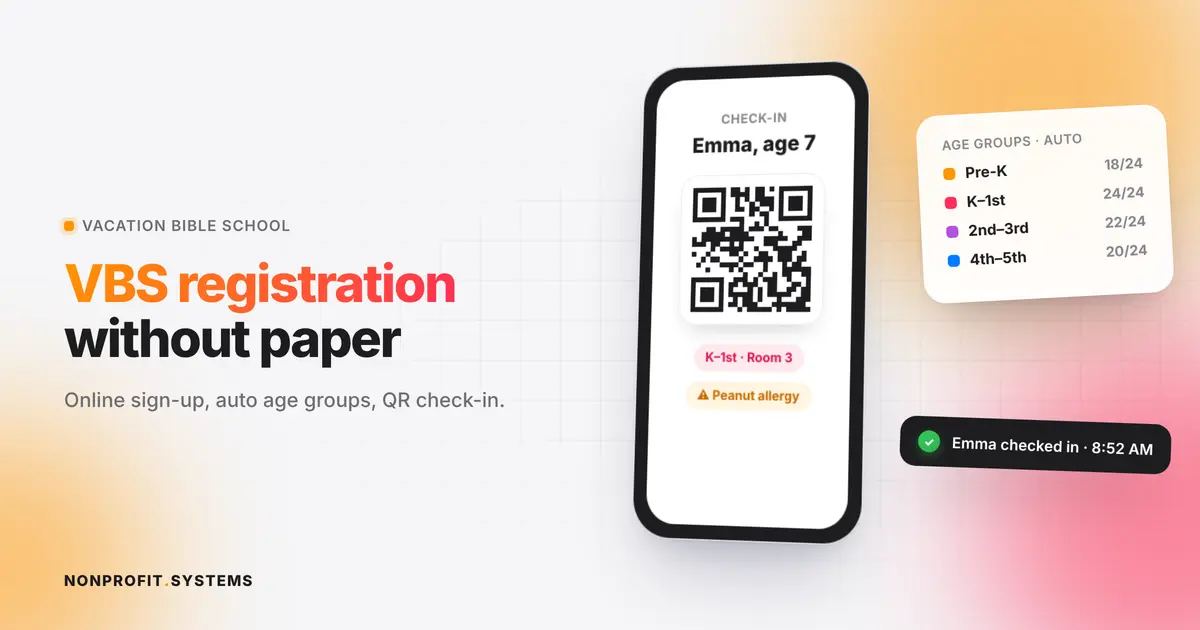
- assigns each child to a group by birthday or grade using your rules (for example, Pre-K 4 to 5, K to 1st, 2nd to 3rd, 4th to 5th)
- respects capacity limits and opens a waitlist when a group is full
- keeps siblings or friends together when parents ask
- shows each leader only their own roster, with allergy alerts highlighted
The same logic works for church preschools and kindergartens that need age-based classes.
How QR check-in works
- After registering, each family gets a QR code by email or text.
- At the door, a volunteer scans it with a phone or tablet.
- The child is marked present, and a name tag prints with the group name and an allergy icon if needed.
- At pickup, the adult shows the same code, and the system confirms they are on the authorized list.
A check-in line that took 40 minutes on paper typically moves in a fraction of the time, and you have an accurate attendance count every day.
Pair faster check-in with a clear child check-in security policy for pickup, allergies and volunteer responsibilities.
Volunteers need registration too
Treat volunteers like participants:
- online volunteer sign-up with role preferences
- background check status tracked in the same system
- automatic shift reminders
- each volunteer sees their group, room and schedule on their phone
Communication during the week
With every parent's phone number in one place, you can send:
- a welcome message on Sunday night with drop-off instructions
- a quick alert if pickup moves because of weather (useful in Florida summers)
- a thank-you and an invitation to Sunday services after the week ends
Common VBS registration mistakes
- Using a generic form tool. Fine for collecting names, but you still group, print and check in by hand.
- No capacity limits. You end up with 40 kids in a room planned for 20.
- Allergy info on paper only. It needs to be visible to the leader at the moment it matters.
- No follow-up. VBS brings in many families who are new to your church. Their contact info is the start of a relationship.
A real example
At International Bible Church in Boca Raton, we are building VBS registration with automatic age grouping into the church's own website. Families register online, kids are sorted into groups by age, and the same system will handle check-in. It sits next to the church's food distribution registration and calendar, so staff manage everything from one admin.
See how our VBS camp registration and check-in system works, or explore the VBS check-in app.
FAQ
When should a church open VBS registration?
Most churches open registration in February or March for a June or July VBS. Opening early helps you plan supplies and volunteers.
What information should a VBS registration form include?
Parent contact details, each child's name, date of birth, grade, allergies and medical notes, authorized pickup people, and consent for medical treatment and photos.
How do you group kids at VBS?
By age or grade, with a capacity limit per group. A registration system can assign groups automatically from the date of birth.
Is there a free way to do VBS check-in?
Basic free form tools can collect registrations, but QR check-in, automatic grouping and pickup verification usually need a dedicated system.
Can the same system be used for church preschools or camps?
Yes. Age grouping, consents and check-in work the same way for kindergartens, day camps and youth events.
A practical first step
Free church website audit
Share your website. We will review the visitor experience, mobile layout and the next steps for your church or nonprofit.